


Showing posts with label Tech Current Affairs. Show all posts
Showing posts with label Tech Current Affairs. Show all posts
Friday, 21 June 2019
 02:19
02:19
 Unknown

Thursday, 14 February 2019
Smartphone Technology Trends to Look for in 2019

Source: omaghenterprise.co.uk
With the proliferation of mobile devices around the world, namely smartphones that come with digital assistants like Siri and Alexa that streamline our lives and make practically everything easier, it’s hard to imagine how mobile technology can improve even further than it has already. Well, whether we can believe it or not, it’s happening. And no, I’m not referring to displays that are getting smaller or larger, or headphone jacks that are disappearing in favor of wireless audio; I’m talking about actual smartphone technological innovations we’ll soon see, i.e. upcoming smartphone technology in 2019.
Before we begin, keep in mind that many of the tech trends we’re going to cover today are based in speculation and scattered reports with enough validity that they’re likely true. With that in mind, many big brands have already confirmed upcoming smartphones in 2019 and other tech upgrades they’re trying out. Let’s get started!
Smartphone Technology in 2019
Multi-Camera Phones
While we saw an influx of dual-camera phones in 2018—phones with dual lense setups in which one took the pictures and the other captured the depth of field—to allow for camera features like portrait mode, 2019 seems prime for an expansion and the inclusion of camera options like wide-angle, telephoto, depth sensing and monochrome.
In fact, almost 42% of smartphones sold globally in July 2018 sported two or more rear camera sensors (27% increase in market penetration), a charge that was led by brands like OnePlus, Huawei and Apple. As for 2019 and beyond, we already have the Huawei P20 Pro, the world’s first triple lense camera, a patent by LG hinting at a smartphone with 16 lenses, and we even have a leaked photo of a Nokia smartphone with five rear camera lenses.

Source: androidauthority.com
5G-Enabled Phones
With Qualcomm introducing the Snapdragon 855 processor late last year, which will power most Android smartphones and allow them and others to connect to 5G networks that enable faster speeds and better coverage, it’s clear that 5G is soon to be mainstream. Keep in mind that it’ll take a while for this to happen—probably 2019 and 2020—so for now we’ll cover what’s expected in 2019:
● Apple: Nope, Apple doesn’t seem too keen on putting forth a 5G smartphone.
● Samsung: Samsung announced last year that they were working with South Korean telecommunication companies to release its first 5G phone, which will likely be part of the Galaxy S10 family.
● Google: Nope, Google doesn’t seem too keen on putting forth a 5G smartphone, BUT Verizon, who it’s been using as it’s exclusive carrier partner for Pixel phones, said it’s planning to roll out its 5G network this year.
● LG: In August of last year, LG confirmed that its first 5G phone will debut on Sprint in the first half of 2019, just as Sprint launches its 5G network.
● Huawei: We already know that Huawei’s first 5G smartphone is coming this year, likely before the end of June 2019, but it’s unlikely that it will be available in the US.
Foldable Phones
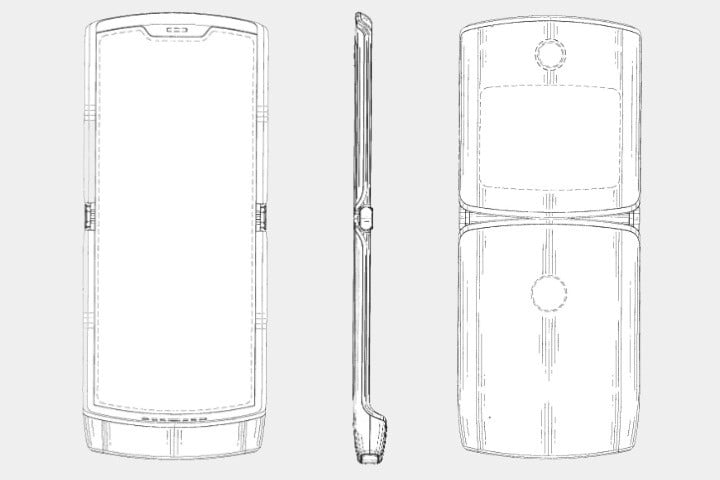
Source: digitaltrends.com
Final Thoughts
Out of all of the technological innovations we have, it’s sometimes hard to stay up-to-date with everything that’s coming out. That’s why today, we focused on something that most of us can relate to: mobile technology. Here’s what we covered:
● Multi-camera phones that allow for much more options when you want to snap a picture
● 5G-enabled phones that work much faster than any phone today, even in low-coverage areas
● Foldable phones that truly fold and unfold without screen imperfections
Enjoy what’s to come!

Thursday, 15 November 2018
How Smartphones are Revolutionizing Business Growth

100 years down the line, if you were to ask historian what the biggest advancements of the early 21st century were, chances are very good that the smartphone will make the cut.
With almost 4 billion unique worldwide users, uses that number the thousands, if not millions, and the fact that over half of all internet traffic today comes from the mobile web, it’s clear that smartphones are taking over the role of “man’s best friend.”
There’s just no escaping it…businesses included.
But for them, unlike seeing smartphones as friends, they see them as opportunities for growth.
How to Use Smartphones for Business Growth
Apart from the general usefulness that smartphones bring to business in terms of mobility and 24/7 connectivity, the smartphone’s impact on business—the biggest impact—can be seen when you consider what makes them different than their normal counterparts: the “smart” that precedes it.
With that moniker comes the ability to use a multitude of applications, which come in various shapes and sizes that vary by use.
For example, you can have an app that allows you to dabble in the stock market, and another that lets you play Scrabble with people around the world.
More on the business side, smartphone business apps usually fall into two categories:
● Internal applications that benefit a company by streamlining tasks and creating more efficient work environments
● External applications that benefit a company’s customers, thereby benefiting the company itself through branding and loyalty perks, data gathering and, if an eCommerce, extra sales
After all, with increased productivity from internal apps comes business growth, and as we all know, a happy customer is a loyal customer (also key for growth), which external apps are excellent at fostering.
Internal Smartphone Business Apps
Starting with internal smartphone business apps to showcase how to use a smartphone for business, the key here is focusing on increasing productivity.
The good thing is that because applications can be programmed to do pretty much anything—helping employees throughout their day included—they can be used as tools to fix anything that’s lagging or needs improvement.
In this way, business growth comes internally, as employees are able to work harder and smarter, resulting in overall better company productivity and a better return on the business’ investment.
For example, you can create the following types of applications among many to improve your business’ processes:
● Customer Relationship Management (CRM) apps that help you manage customer relations
● Lead generation apps that help you identify potential customers
● Inventory management apps that help you keep track of everything
As to where or who to go to for inspiration, because these apps will be the tools your employees use as they go about their workdays to streamline tasks, improve efficiency and help the company run more smoothly, they’re the ones to turn to.
External Smartphone Business Apps
Unlike internal applications, the idea with external, client-facing apps is to present your company to your audience in mobile form to maximize interactions with them and make the most of them.
After all, considering that 71% of total digital minutes are spent on mobile devices, it makes sense that you’ll use mobile, their apparent preferred mode of communication, to connect.
In doing so, you’ll be turning your app into a marketing channel that works at all times of the day, and may even bring its own revenue if you can sell products and/or services through it.
However you choose to make use of external apps, some of their benefits are that they:
● Improve communication between you and your audience
● Provide information to your audience at all times of the day (even better if a chatbot is used)
● Present your offerings in a visual and convenient way
● Ensure loyalty through rewards and promotions
● Gather customer data and insights through usage statistics
More on the last point, one of the biggest benefits of client-facing apps is that they’re a literal goldmine of user data, including their browsing and purchasing habits, which is a great help when creating and tailoring marketing strategies.
The Current Smartphone Landscape
When it comes to growth through smartphones, though internal applications will give you much-needed help running things within the business, external apps are where true growth will come from.
For example, think of the 125 Million U.S. consumers who own smartphones and that, as of December 2017, 82% of online users in the U.S. used a mobile device for online shopping, with 35% being mobile-only online shoppers.
Apart from eCommerce, think of one of the main uses for apps: entertainment.
As it happens to be, the mobile entertainment market—comprised of games, videos, and music—is expected to grow at a CAGR of over 15% during the period between 2018 and 2023, with games generating $40.6 billion in revenue in 2017.
With these stats, it’s clear that pairing an app with an eCommerce business is not only the logical thing to do, but what will open doors for more sales to come through, and that putting out an entertainment app that gives your users new ways of discovering and viewing your content is exactly what they want.
Final Thoughts
With the ability to do practically anything through an app, smartphones are absolutely wonderful for businesses and consumers alike.
For example, while consumers gain a new channel to browse and buy products, or learn more about a company, businesses also gain a new channel, this time to sell to and connect with their audience, and the ability to create apps that streamline various processes.
Putting it all together, smartphones are definitely a “win’ for business.
Monday, 8 October 2018
What to Expect for the Future of Smartphone Technology

Over three-quarter of U.S. adults (77%) say they own a smartphone, up from 35% in 2011, making the smartphone one of the most quickly adopted consumer technologies in recent history. Expanding borders, there were 1.57 billion worldwide smartphone users in 2014, a number that’s expected to nearly double (2.87B) by 2020.
In other words, a lot of people use smartphones.
Why? What about smartphones is so special that practically everyone either has one or wants to get one?
For starters, look at the name. Being smartphones means that their capabilities extend past that of normal mobile phones, as they have what we now consider essential functions, such as:
● Internet connectivity, whether through WiFi or mobile data
● High-quality cameras
● Biometric authentication
● And countless applications with functions that range games to increasing productivity
After all, likened to small computers that fit in your pocket, it’s clear that advancements in smartphone technology have taken them very far from their beginnings as solely two-way communication devices.
If we’ve come this far, what’s to come? What are some future smartphone features that we can expect in the years to come?
From alternate realities that can combine the real and the imaginary, to holograms that allow for real-life interactions with the virtual, here are three things to expect from future smartphones.
1. Blockchain
For those who have either heard of blockchain, but don’t really know what it is, or have never even heard of it, blockchain is essentially a type of ledger—a very secure ledger—that’s composed of cryptographically linked records.Each record, called a block, is time-stamped and linked to the previous block to create a decentralized database of records, which functions as a peer-to-peer (P2P) network that’s extremely secure because, once a transaction takes place, the block created is unchangeable.
With that in mind, while blockchain is often reserved for finance discussions around cryptocurrency like bitcoin, its capabilities can actually extend to smartphones. After all, having a phone that runs on blockchain means that breaches or hacking are negligible.
For example, the upcoming Finney Blockchain Phone, announced last year by Sirin Labs, is an open-source smartphone that runs on the blockchain and is designed to support inherent blockchain applications like a cold storage crypto wallet, secure exchange access, encrypted communications, and a P2P resource sharing ecosystem for payments.

With an extra layer of security provided by blockchain, future smartphones like the Finney can provide much-needed peace of mind that comes with owning a device that has practically all your information and can be hacked into in seconds.
2. Alternate Realities
Advancements in smartphone technology have made it so we can enter different realities at the touch of a button.Case in point, virtual and augmented reality.
While virtual reality (VR) completely transports you to a virtual world, augmented reality (AR) combines the real and the imaginary by overlaying a digital layer over real-world elements.
Whatever reality you choose, the popularity of devices like the Samsung Gear VR and applications like Snapchat and Pokemon Go has opened the door for programmers and developers to dip their toes in these alternate realities.
Specific to AR, because smartphones are portable, they serve as the perfect platform for users to augment the world around them. For example, future smartphone features can include an augmented map that visually guides you where you need to go through arrows that only you see or an information hub that tells you more about what you’re looking at (e.g. looking at a restaurant presents its name, menu, ratings, and reviews, etc.).
3. Holograms
While Apple’s Retina Display that delivers resolutions so sharp that we can’t actually perceive them may be the peak for screens in terms of resolution, the addition of holograms can take the smartphone as a whole to a whole new level.For instance, we already have 3D screens in phones like the IQH 3D, and by combining this features with projections, we can create holograms that jump from the screen.
In use, because we can ‘grab’ what’s being projected, we can digitally touch what’s on our phones. For example, we can do things like resize and rotate pictures by ‘physically’ pulling, compressing and rotating them, or create and edit 3D models as if they were physically in front of us.

Let’s Take a Second Look
With future smartphone technology looking so good, it makes sense to go over what we covered one more time:1. Blockchain that will make future smartphones more secure than ever before.
2. Alternate Realities that combine the real and the imaginary.
3. Holograms as future smartphones features that allow us to ‘grab’ what’s being projected.
Enjoy what’s to come!
Wednesday, 19 September 2018
Sony announces retro PlayStation Classic with 20 games
 |
| Sony announces retro PlayStation Classic |
After Nintendo, Sony just announced that will bring back the PlayStation Classic device after 25 years ago because in that time it sold more than 100 million copies.
the device maintains the same identity but smaller than the original by 45 % and also comes with two arms control because the company tries to give the players the old feeling of the game.

Source
Thursday, 13 September 2018
LG V40 ThinQ officially coming on October 4
 |
| LG V40 ThinQ officially coming on October |
the company announced this big event on the official youtube channel, the video gives a hite about new phone that will be carry five cameras, three on the back and two on front.
The new phone comes with a 6.4-inch screen. and snapdragon 845 processor with 6GB RAM and 128GB of storage memory that can be increased through an MicroSD port. and work with android 9 pie, all these specifications will work on a 3300 mAH battery.
Source
Friday, 7 September 2018
Microsoft announces October 2 event in New York
 |
| Microsoft announces October 2 event in New York |
Microsoft began distributing invitations to the event, which will be held by the company early next month, specifically on October 2 in New York City to be the main event for Microsoft this season.
The invitation poster carries the phrase "moment of your time" with only a big line, But the company is expected to update its Surface Pro, Surface Laptop and Surface Studio devices in addition to Surface Book, all these devices are upgradeable.
Expectations to detect a new product such as the Surface Phone or the Surface Watch look very shy but options are not excluded.
After all, if you are a fan of US technology, you have an appointment with exciting weeks, the start with the Apple event next week then Microsoft event and then Google Inc event on October 9.
Microsoft brings Alexa support to Xbox One
 |
| Microsoft brings Alexa support to Xbox One |
After huge success of the new system of control Kinect with Xbox, the device gives the users the ability to direct voice commands and analysis the movement of the player through the camera.
Today, Microsoft is testing a similar system with Xbox One, but they will use Alexa voice control.

this audio system fully controls the device and gives the user the ability to turn on and off the Xbox One with voice commands, it even controls the game from the level of sounds and the accuracy of the image to the broadcast.
Source
Thursday, 6 September 2018
Here’s Why You Should Invest in a Mobile Website Before a Mobile Application

Mobile apps or websites: a question virtually all business today have to ask as they decide how to establish a mobile presence. After all, Google announced a while back they were enacting a mobile-first index in which they would start using a business’ mobile site for ranking purposes — a signal to turn mobile if any.
Both are great, but if you’re going to introduce yourself to your industry, you may have to choose one before you venture into the other.
Keep in mind that both are usually needed in the long-run. This, of course, depends on what exactly your business does, but you’ll be hard-pressed to find a brand that won’t benefit from one or the other.
For one, a website is absolutely perfect for discovery and promoting brand awareness. Apps, on the other hand, excel in engagement and promoting brand loyalty.
But, and this is a big but, while both should ultimately be created, today we’re going to discuss why a mobile website takes precedence over their application counterparts.
In doing so, we’ll discuss the difference between mobile apps and websites, why a website should be your initial go-to, and finally, when it makes sense to opt for a mobile app first instead.
What are Some Differences Between Mobile Apps and Mobile Sites?
Starting with the differences between apps and sites, a mobile website is just like any other website consisting of browser-based HTML pages accessed over the internet, albeit made specifically for mobile devices.
Quick tip: Always choose a responsive website that resizes content for the screen it resides in over a mobile-specific site, but that’s a discussion for another day.
Like websites, applications pull content and data from the internet, but they go beyond by being able to download the content for offline usage.
Side note: You also have the option of getting a progressive web app that can be described as an amalgamation of a site and app.
Unlike websites, apps are downloaded from device-specific marketplaces like Apple’s App Store and Android’s Google Play and are installed on mobile devices. As such, they can be accessed even when there’s no internet connection, although actual functionality may be hindered if a connection is required for usage.
App vs. Website Usage: Why Websites Should Come First

Choosing to start with a website over an app (or vice versa) comes down to what your end goals are.
For example, if you want to introduce a game to the market, starting with an app is a good idea. If, on the other hand, you want to publish content to as wide an audience as possible, a website is a way to go.
But, seeing as how the vast majority of businesses fall on the latter category, today’s discussion centers on why a website should come first.
For starters, let’s talk about compatibility. Whereas mobile websites can be accessed by all devices, regardless of operating system (OS), applications are restricted to a single OS, meaning that multiple apps will need to be developed if you want to reach all users.
Then there’s findability and reach; you want as many people to find you as possible, and websites surpass apps in this capability because they’re there for all to see. This is because, as we just covered, apps are restricted to devices and their OS, and websites can be found with a simple Google search that encompasses the entire web.
Additionally, you have to think of your user’s commitment; websites come with less commitment because all you have to do is visit them to see their content. Apps are different because there’s an initial download required before you can see what they have to offer, leading to fewer downloads when compared to page visits.
Out of commitment comes immediacy, which is how available a website or app truly is. Because they can be accessed by pretty much all browsers on all devices, websites are readily available for all, unlike apps that, again, need to be installed first.
You also have to consider that nothing is static; things change and apps and sites both need to be upgraded and updated from time to time. In other words, upgradability.
Because website updates like layout or content changes can be published instantly for all users, any change only needs to be made once and everyone benefits. Apps, on the other hand, need to be updated user-by-user (if the app store accepts the update in the first place), and an updated created for each OS.
Finally, like most business endeavors, you need to consider your budget. While both sites and apps can be developed with templates that make the whole process cheaper and easier as a whole, mobile apps are generally more expensive to create and maintain.
Therefore, while you may need both at some point, it’s always best to start with a website, and once your budget allows it, extend to a mobile app.
Final Thoughts: When a Mobile App Comes out on Top

It’s not always the case that a website should be developed before a mobile app. For example, opting for an app first is best for those developing interactive content like games that are meant for mobile use.
In this case, a product—the app—should be developed and deployed first, followed by the website that points users toward the app.
Along with a similar vein, if you’re using native functionalities like a camera, gyroscopes or sensors, you’ll do best with an app that can access all of these and more, as websites will usually be unable to do so.
Finally, when an internet connection isn’t required for use, or when content can be downloaded and used offline, such as a dictionary with content that can be refreshed whenever there’s a connection, an app will generally serve you better.
But, like we briefly touched on earlier, because the points for website-first development relate to more brands than the ones for app-first, it’s recommended to invest in a mobile website before a mobile application.
Best of luck!
Facebook sues BlackBerry for theft
 |
| Facebook sues BlackBerry for theft |
After blackberry accused WhatsApp and Instagram violating the messaging application, this time according to the new reports from bloomberg, Facebook accused blackberry company of infringing on their voice messages.
Facebook filed a lawsuit against Blackberry at the San Francisco Court and accusing Blackberry of violating and demanding compensation from the court for six inventions.
Source
Monday, 3 September 2018
The revolution of skype design
 |
| Microsoft is redesigning Skype once again |
microsoft made changes to the design of the Chat application, from time to time the company added and deleted some options until they reached the new simple design of Skype.
these changes made the design look like Snapchat, where some users see it as complex in the interface.
the director of the design said ( we need to step back and simplify skype) he also said ( many users have found some difficulty to make calls, and even Highlights options not been welcome by the users)
on these new design, Skype focuses on why people stick to their videos calls and texting by the app, and they gonna delete the obsolete features and keep this simple design on the interface.

Thursday, 16 August 2018
The Importance of Managing Your Mobile App Permissions
 |
| source: wired.com |
Smartphones are what they are because of the applications they house. Without them, they wouldn’t be smartphones; they’d be phones.
Whether it’s an app that counts how many steps you’ve taken, an app that lets you browse your social feed, or an app to edit your pictures until they’re perfect for Instagram, mobile apps are what makes our phones smart, and what makes them so hard to put down.
But, and this is a big but, have you ever stopped to think about what your favorite apps are doing with your data?
The thing is, many of us don’t think twice about the permissions we give our mobile apps after tapping the initial “Allow” when first opening them. Based on everything we’ve been hearing on the news lately about privacy and misuses of data, this is definitely not a good idea.
Permissions and Mobile Apps
Before we get to that why it’s not a good idea to stay in the dark about permissions, let’s do a quick overview on what they actually are.
App permissions are the privileges we give them; they’re what we allow our apps to do or not do with our phones and data. For example, whether we allow an app to access our phone’s camera or microphone.
For the most part, developers stick to what’s important. They’ll only request permission for something if it’s important for the app’s function, such as allowing an image editing app to access your photos.
That being said, app permissions to avoid are those that don’t impede on the app’s function. So if it’s not important to you, such as allowing an app to send you to push notifications, feel free to disallow it.
If you experience difficulties with that app after disabling the permission, such as trying to take a photo through a messaging app after disabling Camera access, simply turn it back on.
Why and How to Manage Your App Permissions
Now that we’ve covered app permissions, it’s time to talk about why and how to manage them.
For starters, you probably spend a lot of time on your apps, whether it’s messaging your friends, checking up on emails or watching movies. In other words, the more time you spend on those apps, the more data you’re feeding them.
Keep in mind that this isn’t inherently bad, after all, your apps need some permissions to work properly. But, there’s also a lot behind the scenes with some apps you may be unaware of.
For instance, why they need access to a specific permission even though it’s not entirely clear why it’s even needed in the first place. Because of this, it’s always important to audit your apps every now and then to ensure they’re not reaching beyond their means — example, if a video streaming app wants access to your Contacts.
It comes down to the fact that you need full control over all your data, and you can only do this by actually knowing what your apps are accessing.
Seeing as how iOS and Android are two of the most popular operating systems with mobile phones, let’s cover how to manage app permissions with these two.
Managing Your iOS App Permission List

Starting with iOS, because most devices that run on it are quite similar in terms of permissions, this guide should work for all.
To begin, find your phone’s app permission setting by going to Settings and tapping on Privacy.
Instead of seeing a list of apps and tapping on each to see its permissions, here you’ll see a list of all permissions, which you can use to find a specific one to see which apps have access to it.
Once you know which permission to manage, tap on it to see a list of apps that fall under it. If you want to turn the permission off for that specific app, simply tap on the app and you’ll be presented with a couple of options.
For instance, if we’re looking at the permission to access Photos, and from there the Facebook Messenger app, you’ll land on a screen with two options: “Never” or “Read and Write” (never is no and read and write is yes).
If you instead look at the Microphone permission, you’ll see a screen with the apps with that permission, which you can turn on or off by tapping on the slider. For another permission, let’s say Apple Health, you have more options, such as tracking how many hours you sleep or steps you’ve taken.
If, on the other hand, you want to get down to the nitty-gritty and go app by app instead of permission by permission, scroll past Privacy (don’t tap on it) until you see a list of all your apps.
To see exactly what each app has access to, tap on whichever one you want to see. After tapping, you’ll see a detailed menu of what that app can or can’t do.
For example, tapping on the Amazon app will show you that you can give it access to:
● Camera
● Siri & Search
● Notifications
● Background App Refresh
● Cellular Data
Additionally, you can choose to allow biometric authentication for sign-in if your phone has that capability.
For other apps, the process is the same, so feel free to check up on whichever you want.
Managing Your Android App Permission List
Moving to Android, there’s a lot of variety when it comes to devices that use it, and today we’ll be focusing on the Google Pixel. Like iOS, the process is similar for most, so this should be fine regardless of which Android device you have.
To begin, open Settings and go to the Apps & Notifications menu. Here, tap on a specific app you want to check.
Once on that app’s menu, tap Permissions to see everything it has access to, such as Location Services, Photos, Camera and more.
If you want to turn off a specific permission, simply tap on it. Keep in mind that if the permission is vital for the app to function properly, you may have to accept a confirmation that you do indeed wish to turn that permission off.
Simple as that. Like iOS, feel free to go through all your apps to make sure they’re only accessing what you want them to access.
Final Thoughts
Compared to the past, data is worth more than ever today — it’s the currency of choice for many.
For this very reason, it’s that much more important to manage your data and ensure it’s not falling in the wrong hands.
So be it your location or your contacts list, whatever it is, you need to know exactly who has access to it and why.
Good luck!
Thursday, 12 July 2018
How Mobile Is Revolutionizing Healthcare
 |
| source: Aumcore.com |
Benefits of Mobile Devices in Healthcare
The use of mobile devices in healthcare is acting as a catalyst to a paradigm shift that is changing the way the whole industry works. By allowing doctors to communicate with patients from anywhere in the world (and vice versa), mHealth is proving to be a great asset that allows for remote diagnoses and health tracking so delays in response are reduced or completely eliminated; if anything happens, action can be taken right then and there.For example, with IoT and the emerging technology it brings that’s connecting tools like never before, and thanks to the mobile technology that’s streamlining processes and synthesising information with real-time information and updates, we now have remote patient monitoring that allows doctors to treat and diagnose patients who otherwise can’t make an in-person visit. They can review patient records and history while giving nurses and caregivers advice on what to do, and collect medical and health data and revert it back to them with accurate diagnoses. In doing so, they can help the elderly or those who can’t travel, such as expecting mothers, and provide services whenever they’re needed. Additionally, with the use of sensors in mobility devices like walkers and canes, alerts can be sent in case of accidents like a fall.
Along with a similar line, wearable devices like Fitbit, iWatch and a myriad of others are proving to be excellent for monitoring vitals and making sure everything stays in check. They can track health and wellness to ensure optimal health, and in case an emergency comes up (or is about to), (early) warnings and alerts can be sent to medical professionals to prevent disaster. As such, they can be also be used in chronic disease management for early detection of deterioration, such as in the maintenance of diabetes. In such a case, wearable devices can test blood pressure and glucose levels to ensure things are going as they should. Similarly, devices like wireless BP monitors, resynchronization therapy, and pacemakers can be used to reduce the risk of heart failure.

Mobile Apps in the Healthcare Industry
The buzz around mHealth isn’t just about physical devices, it’s also about certain mobile apps that are similarly revolutionizing healthcare. For example, HealthTap, a technology company that delivers a suite of connected health apps, surveyed more than 65,000 physicians in its network and another 500,000 in its referral network on their recommendations on a wide variety of health and wellness apps. Here are the top 10 apps for iOS and Android they found:Top Health and Medical Apps for iOS
1. Calorie Counter and Diet Tracker (MyFitnessPal.com)2. Weight Watchers Mobile (Weight Watchers International)
3. Lose It! (FitNow)
4. White Noise Lite (TMSoft)
5. First Aid (American Red Cross)
6. Runkeeper (FitnessKeeper)
7. Stroke Riskometer (Autel)
8. Emergency First Aid & Treatment Guide (Phoneflips)
9. Instant Heart Rate (Azumio)
10. Fooducate (Fooducate)
Top 10 Health and Medical Apps for Android
1. Weight Watchers Mobile (Weight Watchers International)2. White Noise Lite (TMSoft)
3. Lose It! (FitNow)
4. First Aid (American Red Cross)
5. RunKeeper – GPS Track Run Walk (FitnessKeeper)
6. Emergency First Aid/Treatment (Phoneflips)
7. Instant Heart Rate (Azumio)
8. Fooducate – Healthy Food Diet (Fooducate)
9. Glucose Buddy – Diabetes Log (Azumio)
10. Pocket First Aid & CPR (Jive Media)
Final Thoughts
We are in an era marked by the digitization of practically everything, including the healthcare industry. This means quick diagnosis and timely and efficient intervention when it’s needed, and real-time visualization of a patient’s health that saves both time and resources. In translation, mHealth appears to be a clear-cut win-win.
Tuesday, 3 July 2018
Sony raises the price of PlayStation Vue service subscriptions
Basic service will be $ 44.99 and the highest service will be $ 84.99

Sony announced the price increase of Vue service to users for $5 for all subscriptions, the new changes will take place by the end of this month so that the basic subscription price rises from $ 39.99 to $ 44.99.
Vue offers premium content services, offering many options for users, especially for many entertainment networks in the United States.
The company said that the rise in the price of service comes as a result of higher operating costs as well as prices in general, which requires them to increase subscription prices to keep pace with the continuous rise.
The service offers 4 types of subscriptions: Access, Core, Elite, and Ultra. The price will be the same for all subscriptions. Basic service will be $ 44.99 and the highest service will be $ 84.99.
The service is available on Playstation as well as a number of interactive TVs, in addition to the availability to users on the computer and smart devices. The number of subscribers last year was more than 400,000.
Source
Sony announced the price increase of Vue service to users for $5 for all subscriptions, the new changes will take place by the end of this month so that the basic subscription price rises from $ 39.99 to $ 44.99.
Vue offers premium content services, offering many options for users, especially for many entertainment networks in the United States.
The company said that the rise in the price of service comes as a result of higher operating costs as well as prices in general, which requires them to increase subscription prices to keep pace with the continuous rise.
The service offers 4 types of subscriptions: Access, Core, Elite, and Ultra. The price will be the same for all subscriptions. Basic service will be $ 44.99 and the highest service will be $ 84.99.
The service is available on Playstation as well as a number of interactive TVs, in addition to the availability to users on the computer and smart devices. The number of subscribers last year was more than 400,000.
Source
Friday, 15 June 2018
Blockchain Smartphones: Are They Worth the Hype?
 |
| source: coinwire.com |
What Is Blockchain?
When you whittle away the exterior, blockchain is a list of records — called blocks — that are linked together and contain a cryptographic hash of the previous block. It’s essentially a peer-to-peer (P2P) network with a distributed time-stamping server that allows data to be stored globally on thousands upon thousands of servers. In other words, it’s a kind of public electronic ledger that’s openly shared among users around the world, and each time a transaction occurs, an unchangeable record of it is created, time-stamped and linked to the previous one.Despite anyone on the network being able to see everyone else’s entries, blockchain is secure by design and pretty much impossible to be hacked into because it can only be updated by consensus among participants. That is to say that in order for something to be modified, the entire network must first agree on that change. In this way, a blockchain is resistant to data modifications and represents a big change in the way information is shared.
The many advantages of blockchain technology, such as its transparency and accountability, and its success in the banking industry, is spurring other industries to join the game. Case in point, the mobile blockchain, and the smartphone industry.
What Is a Blockchain Smartphone?
 |
| source: zco.com |
Examples of Blockchain Smartphone Technology
Now that you know some of a blockchain phone’s benefits, it’s time to get acquainted with the phones bringing them to us.
Finney Blockchain Phone
First up is the Finney Blockchain Phone, which was announced last year by Sirin Labs as an open-source model that runs on the blockchain. According to its white paper, it’s going to run on Shield OS, Labs’ open source operating system (OS) that are designed “to support inherent blockchain applications, such as cold storage crypto wallet, secure exchange access, encrypted communications and a P2P resource sharing ecosystem for payment.” As such, users will be able to securely store cryptocurrencies on their phone and use it for payment, sort of like an Apple Pay or Google Pay.BitVault
Also announced last year is BitVault, which Embedded Downloads is touting as the world’s first crypto communicator and blockchain smartphone. With a third-party Independent Multilayer Security (3IMS) feature that works with fingerprint recognition and iris scans, paired with other features like voice and video calling, messaging and document sharing that are protected with private blockchain, this phone is the epitome of security. A quick note, unlike a public blockchain that allows anyone to participate, a private blockchain required an invitation and validation.Due to its high security, BitVault is perfect for government entities, financial institutions, police personnel, security companies, and pretty much any business or individual who needs more privacy. Because it runs on a completely different OS than your average smartphone, the apps you currently have won’t work on it and vice versa, and to create apps for it, developers will need to purchase a developer license.
HTC Exodus
Finally, we have the HTC Exodus, another smartphone based on blockchain technology that comes with extra security, encryption and cryptocurrency support. This blockchain phone runs on what HTC calls ‘DApps,’ AKA decentralized applications that are also based on blockchain technology, and information from them is verified by users on the network. Each Exodus will also act as an encrypted node on a blockchain network, which essentially makes it VERY difficult to break into, and offers a native cryptocurrency wallet that lets users make and accept cryptocurrency payments to others. |
| source: gsmarena.com |
Final Thoughts
To answer the question posed in the title (are blockchain smartphones worth the hype?), they most definitely are if you value your privacy and security and would prefer not to worry about people with nefarious intentions getting their hands on your data.Enjoy!
Sunday, 3 June 2018
MacOS 10.14 looks like it will get dark mode and apply Apple News
 |
| MacOS 10.14 looks like it will get dark mode and apply Apple News |
A Mac developer named Steve Troughton-Smith was able to get a unique experience on the macOS 10.14, he then published screen shots for the new update which has several different features.
According to developer Steve Troughton-Smith, the next update to the operating system will bring with it the dark mode feature, that is, the user interface will be available in black, and the interface will differ from the older interface of the Xcode application for developers.
The new additions will include an icon for a Mac News app in the Dock, It will likely bring the iOS 11 App Store redesign to the desktop.
Here’s a closer look at the new dark UI chrome. The toolbar buttons are dark gray with white tints for the glyphs. It looks a lot like the editing mode in the Photos app. The Xcode project navigator sidebar features complementary darkened translucent blur material. The Xcode storyboard window includes UI to let developers quickly switch between light and dark appearances.


Saturday, 2 June 2018
Facebook will remove the Trending topics section

For the past four years, Facebook has posted on the Trending topics section of its Web site a collection of news feed that users interact with, and today the social network decided to remove this section.
The criticism Facebook has received over the years has not stopped, about the mechanism of selecting news and placing it in the Trending topics section. in many cases, it has been dominated by unreliable sources and has appeared on the list.
If you have not seen this section before, this is something that is expected and natural, since it was active in only five countries around the world, and through it, news sites received a small percentage of visitors.
At the same time, Facebook is testing a new way to show news on its site, such as breaking news and local news.
Facebook is currently testing the breaking news feature with 80 sites and publishers in several regions around the world, through the test, the site can mark and indicate that this link contains urgent news. facebook did not say whether it would give priority to such publications compared to others.
Facebook is also testing a new section called Today In, which introduces important local news to users, which varies by country and even the city and is updated from local news sites.
Also in terms of news, but on the video way, users within the United States have a date with a special section that displays live live news coverage of the news as well as videos containing daily and weekly summary of events.
Source
Thursday, 31 May 2018
SoftBank invests $2.25 billion in GM's self-driving cars
self-driving cars is the future of the automotive industry
 |
| SoftBank invests $2.25 billion in GM's self-driving cars |
SoftBank plans to invest up to $ 2.25 billion in the US auto industry General Motors specifically with regard to self-driving cars.
The investment will be on two batches, the first $ 900 million to develop the project first, and the second at $ 1.35 billion when self-driving cars are ready for commercial sale.
This investment will be directed to the GM Cruise unit specializing in self-driving cars, the unit will remain a subsidiary of General Motors but a 19.6% stake will be sold to Softbank, and of course the authorities must agree with it beforehand.
GM will also invest $ 1.1 billion in the same unit after the completion of Softbank's investment deal.
According to Dan Amnann, president of General Motors, the most important thing for them is high security where cars must reach a high level of safety before they are ready to launch and sell officially.
This investment comes from Softbank at General Motors after the competition for self-driving cars industry there are Waymo as well as Uber and Tesla and many others are working in this area.
Wednesday, 23 May 2018
Official announcement of HTC U12 Plus
 |
| Official announcement of HTC U12 Plus |
HTC recently unveiled its latest phones for the first half of 2018, where HTC U12 Plus came in line with the leaks we've been talking about for the last few weeks.
Compared to the previous generation, the phone has improved and developed some aspects, such as the camera that has become dual in the front and rear. The Edge Sense options have also been upgraded, battery size increased, and water and dust resistance standards have been improved, as well as BoomSound sound technology.
Specifications HTC U12
- OS: Android 8.0 Oreo with HTC Sense (upgradeable to P)
- Display: 6-inch, Quad HD+ (2880 x 1440) Super LCD 6, Corning Gorilla Glass 5, DCI-P3, HDR10
- Processor: Qualcomm Snapdragon 845, 64-bit octa-core, up to 2.8GHz
- RAM / Storage: 6GB / 64GB (microSD expandable up to 2TB with Flex Storage)
- Rear Cameras: Primary - 12MP wide-angle, HTC UltraPixel 4 (1.4µm pixels, f/1.75), Secondary - 16MP telephoto (1µm pixels, f/2.6 aperture), UltraSpeed Autofocus 2, OIS, EIS, dual LED flash
- Front Cameras: Dual 8MP cameras, 84° field of view (1.12µm pixels, f/2.0 aperture)
- Video Recording: 4K, 60fps with Hi-Res Audio/3D Audio recording with 4 microphones, OIS, 1080p video recording on the front
- Audio: HTC USonic with Active Noise Cancellation, HTC BoomSound Hi-Fi edition, Hi-Res Audio stereo recording, Hi-Res audio certified, Qualcomm aptX HD, LDAC up to 32-bit high-resolution wireless audio via Bluetooth
- Connectivity: USB-C 3.1 Gen 1, Bluetooth 5.0, Wi-Fi - 802.11 a/b/g/n/ac (2.4 & 5GHz), NFC, HTC Connect, AirPlay, Chromecast, DLNA, and Miracast compatible
- Battery: 3,500mAh, QuickCharge 3.0
- Other: IP68 rating, rear fingerprint scanner
- Headphone Jack: Nope
- Dimensions: 156.6 x 73.9 x 8.7-9.7mm
- Weight: 188g
- Colors: Red - Black - Transparent black.
Source
Saturday, 19 May 2018
Honor Play 7 announced
 |
| Honor Play 7 announced |
Honor Play 7 has been announced with low specifications and low price, making it a convenient choice in many markets around the world.
Honor Play 7 specifications
GENERALRelease date: May 2018
Form factor: Touchscreen
Dimensions (mm): 146.50 x 70.90 x 8.30
Weight (g): 142.00
Battery capacity (mAh): 3020
Colours: Black, Blue, Gold
DISPLAY
Screen size (inches): 5.45
Touchscreen: Yes
Resolution: 720x1440 pixels
HARDWARE
Processor: quad-core
Processor make: MediaTek MT6739
RAM: 2GB
Internal storage: 16GB
Expandable storage: Yes
Expandable storage type: microSD
Expandable storage up to (GB): 256
CAMERA
Rear camera: 13-megapixel
Rear Flash: Dual LED
Front camera: 24-megapixel
Front Flash: Yes
SOFTWARE
Operating System: Android 8.1
CONNECTIVITY
Wi-Fi: Yes
Wi-Fi standards supported: 802.11 b/g/n
GPS: Yes
Bluetooth: Yes, v 4.20
Headphones: 3.5mm
Number of SIMs: 2
SIM 1
SIM Type: Nano-SIM
GSM/CDMA: GSM
3G: Yes
4G/ LTE: Yes
Supports 4G in India (Band 40): Yes
SIM 2
SIM Type: Nano-SIM
GSM/CDMA: GSM
3G: Yes
4G/ LTE: Yes
Supports 4G in India (Band 40): Yes
SENSORS
Proximity sensor: Yes
Accelerometer: Yes
Ambient light sensor: Yes
Source